

ModSecurity Error 500
Updated last week
ModSecurity is our web application firewall. Its purpose is to detect and block malicious code injections on our clients’ websites.
This module may generate false positives, causing an edit to a file to result in a 500 error and the permission being blocked (even when performed by an authorized administrator).
If this is the case, we recommend temporarily disabling ModSecurity from your cPanel. To do this, first go to your cPanel at the address shown below, replacing "mydomain.com" with your site’s actual URL.

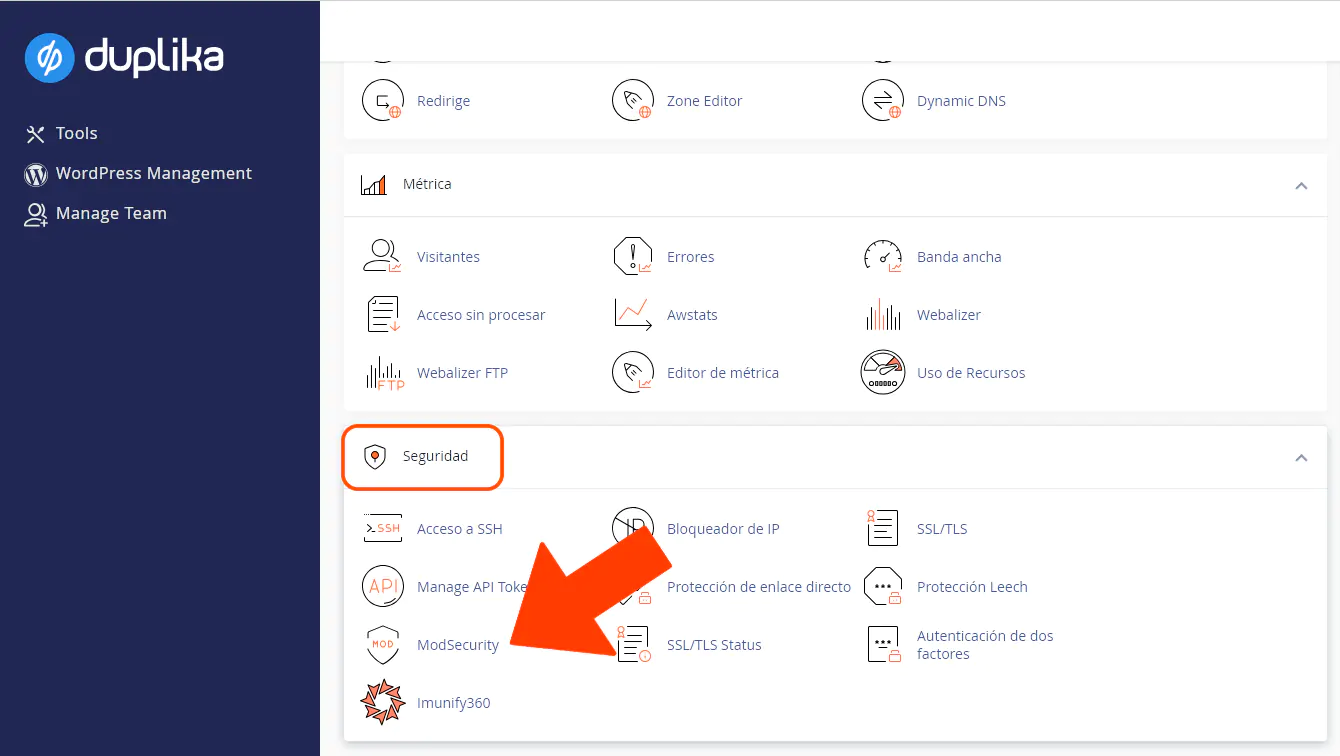
Once in your control panel, look for the ModSecurity icon in the Security section.
Once you’ve opened the tool, click the Disable button.
If this resolves the error, please contact us so we can identify and disable the problematic rule. Once this is done, we’ll notify you so you can continue making edits without having to keep ModSecurity disabled on your account.